
Invoicing & payments
Invoice from the quote and see who still owes you
Create the invoice from the work you quoted, send it as a PDF and keep track of what's been paid. Connect Stripe and your customers can pay by card.
14-day free trial · No card needed to sign up
Everything you need to get the money in
Invoices, payments and supplier costs, all linked to the job.
Invoices from quotes
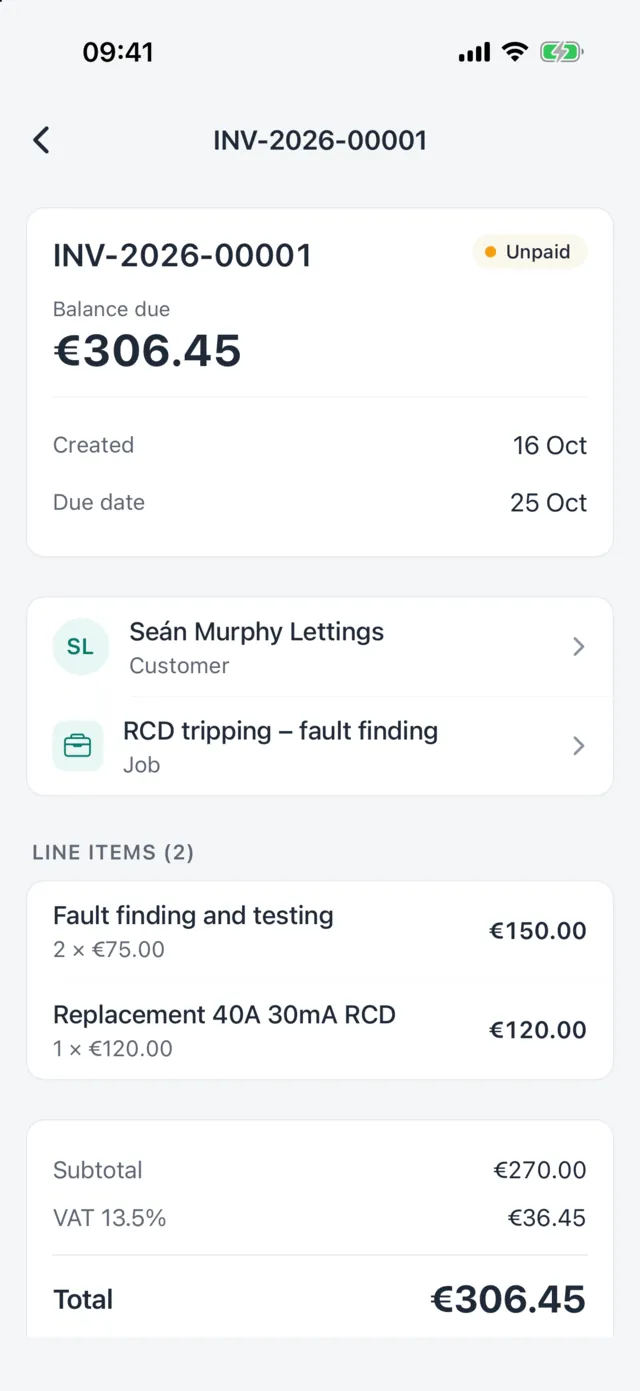
Create the invoice from an accepted quote so lines, prices and VAT carry across.
Irish VAT and PDFs
23%, 13.5% or 0% VAT per line, with a clear PDF emailed to your customer.
Part payments and credit notes
Record payments as they come in, see the balance due, and issue credit notes.
Card payments
Connect your Stripe account and customers can pay an invoice by card.
Reminders
Send a reminder for an unpaid invoice or an open quote when you choose. (Journeyman and Master)
Progress and bulk invoicing
Invoice big jobs in stages on Journeyman and Master; invoice several jobs at once on Master.
Invoicing in detail
Know where you stand
Unpaid and overdue, front and centre
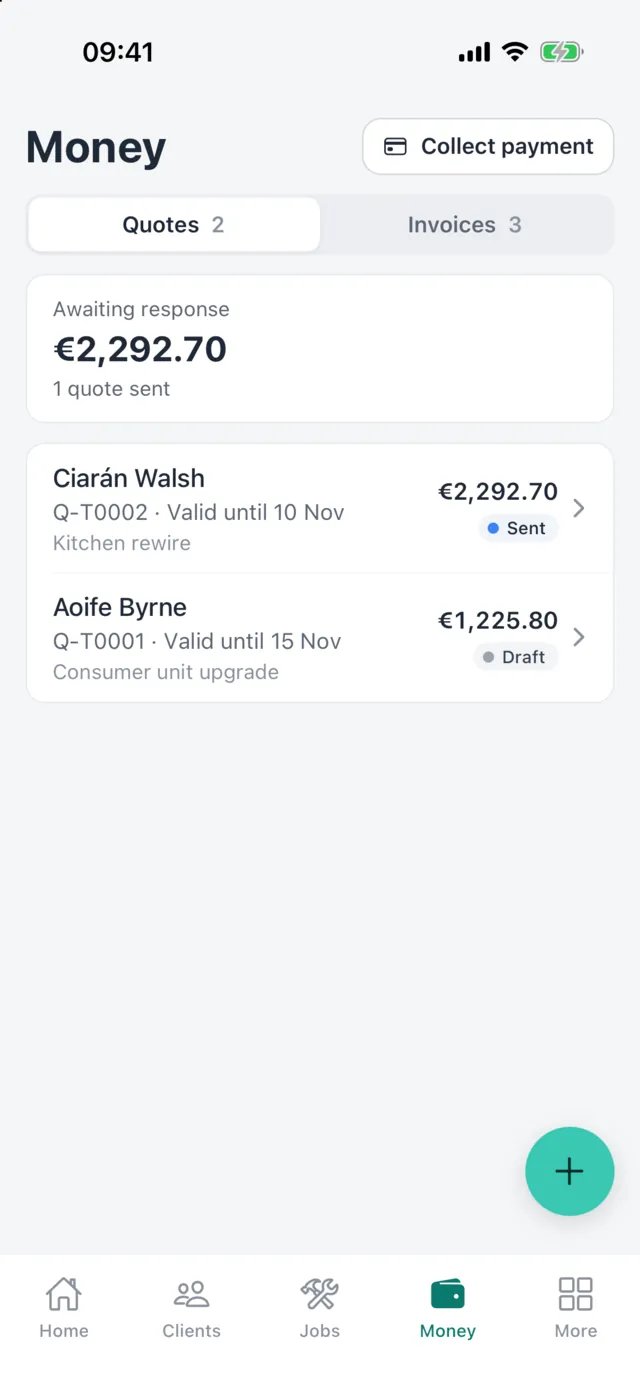
Your quotes and invoices are listed together with what's awaiting a response, what's unpaid and what's overdue, so chasing money takes minutes, not an afternoon of digging.
- Balance due on every invoice
- Overdue invoices flagged
- Quotes awaiting a reply in the same list
Track what the job cost you, too
Record supplier bills against jobs on Journeyman and Master. Master adds purchase orders, kit bundles, and reports on job profitability so you can see which work actually pays.
Screens shown are from the Handl iPhone app, coming soon to the App Store and Google Play. The same quotes, jobs and invoices are in Handl on the web today.
How card payments work
- Connect your Stripe account to Handl. Stripe handles the card details and pays out to your bank.
- Send the invoice. Your customer pays by card through a secure Stripe checkout page.
- The payment is recorded against the invoice in Handl and the balance due updates.
Handl adds an application fee to each card payment collected through Handl, and it gets lower on higher plans: 2.5% + €0.20 on Apprentice, 1.5% + €0.20 on Journeyman, 1% + €0.20 on Master and during the free trial. You don't need Stripe to use Handl; you can record cash, bank transfer and other payments by hand.
On the web
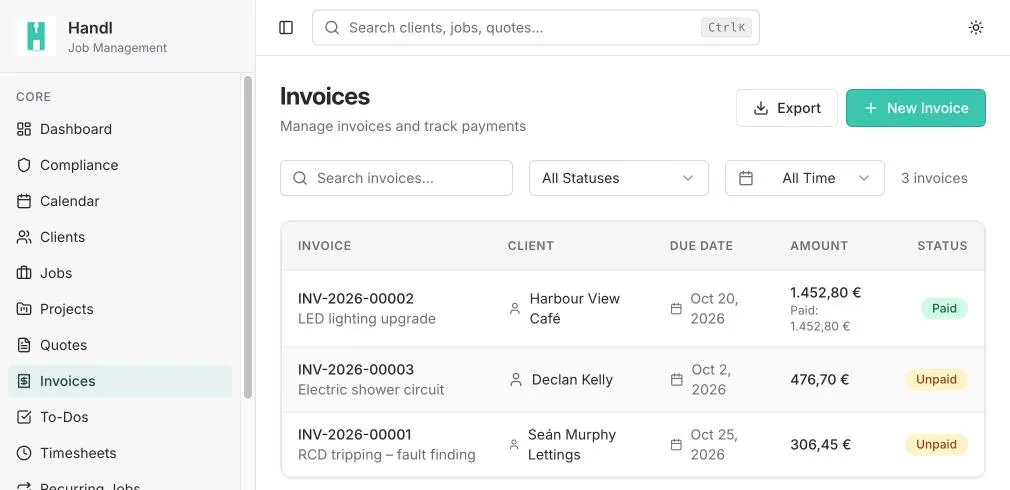
Paid, unpaid and due, at a glance
Handl on the web lists every invoice with its due date, amount and payment status, and what's been paid so far.
Good to know
- Reminders are sent when you press the button; Handl doesn't chase invoices automatically.
- Card payments need a Stripe account connected to Handl. Stripe's own account terms apply.
- Handl doesn't track whether an invoice has been opened. Quote views are tracked on Journeyman and Master.
- Progress invoicing, reminders and supplier bills need Journeyman or Master. Bulk invoicing, purchase orders, kit bundles and reports need Master.
FAQ
Common questions
Can customers pay by card?
Yes, if you connect a Stripe account. Customers pay through a Stripe checkout page and the payment is recorded against the invoice.
What does it cost to take card payments?
Handl adds an application fee to each card payment collected through Handl: 2.5% + €0.20 on Apprentice, 1.5% + €0.20 on Journeyman and 1% + €0.20 on Master. There's no fee for payments you record yourself.
Can I invoice part of a job?
Yes. Record part payments on any plan, and use progress invoicing on Journeyman and Master to bill a job in stages.
Do invoices include VAT?
Yes. Each line can carry 23%, 13.5% or 0% VAT, and the invoice shows the subtotal, VAT and total.
Send your next invoice from Handl
Start a 14-day free trial with every feature switched on. No card needed to sign up.